Guides
Fountain pen troubleshooting
Almost every fountain pen problem is one of six things, and only one of them means the pen is actually faulty.

Work through these in the order given. The causes are listed most likely first, which is deliberate: the commonest problems are also the cheapest to check, and a faulty pen is genuinely rare.
It will not start writing
| Cause | Check | Fix |
|---|---|---|
| The pen has dried at the nib | Was it uncapped, or unused for days? | Dip the nib in water briefly, or write a few strokes on scrap |
| Ink has not reached the feed | New cartridge, or freshly filled? | Hold nib-down for a minute; squeeze the cartridge gently |
| The nib is rotated | Is the engraved side facing up? | Rotate it; see how to use a fountain pen |
| The converter is not seated | Does it move when you push it? | Remove and refit firmly |
| The feed is clogged | Was pigment or shimmer ink used? | Flush thoroughly, soak overnight |
It skips mid-word
Skipping is a flow interruption. The three usual causes are the nib rotating as you write, an air bubble in the converter, or paper with a surface that repels ink — coated glossy stock and some recycled papers both do this.
Test it by writing the same sentence on known-good paper. If it stops skipping, the paper was the problem and the pen is fine.
It skips only on the first stroke
That is a drying problem rather than a flow problem, and it points at the cap. Some caps seal better than others: Platinum's slip-and-seal design exists specifically for this, which is why the Preppy turns up on our lists more often than its build quality alone justifies.
A drier ink makes it worse; a wetter ink usually helps.
It skips on upstrokes
An upstroke pushes the tines apart slightly and interrupts flow. This is normal in mild form, and worse if you are pressing. It also happens if the nib is very dry or the tines are misaligned — look straight down at the tip and check that both tines end level.
It leaks into the cap
| When | Cause | Fix |
|---|---|---|
| After a flight | Cabin pressure drop pushed ink out of the feed | Travel with the pen full or empty, never half, and carry it nib up |
| In a warm pocket | Body heat expanded air in the barrel | Normal. Carry it clipped, nib up, and expect a little |
| Constantly | Cracked section, or an overfilled converter | Inspect the section; expel a few drops after filling |
| Only after filling | Air pocket at the top of the converter | Expel two or three drops back into the bottle |
Quick picks
Ranked for the beginner buying their first setup. Every pick names who it is wrong for.
| # | Product | Best for | Price |
|---|---|---|---|
| 1 |  Pilot CON-40 converter The screw converter that fits the widest range of Pilot pens, including the ones with narrow barrels. | Bottled ink in a Metropolitan or Kakuno | |
| 2 | 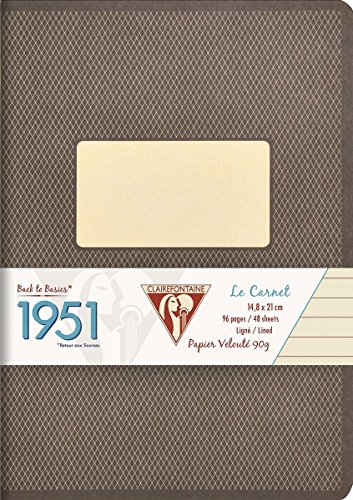 Clairefontaine 1951 A5, lined 90 g/m2 vellum in a stapled softcover, which is the cheapest place to find paper this good. | The best paper per dollar | $9.99 · View on Amazon #ad Price as of October 18, 2026. How this is funded |
1. Bottled ink in a Metropolitan or Kakuno
Pilot CON-40 converter
The screw converter that fits the widest range of Pilot pens, including the ones with narrow barrels.
Pilot sells several converters and they are not interchangeable. The CON-40 is the small one that fits nearly everything; the CON-70 holds far more but only fits wider pens.
The CON-40 has agitator balls inside it, which look like a defect and are not — they stop ink clinging to the walls.
If you own a Metropolitan and want to use a bottle, this is the part.
| Type | Screw-type converterSource: Pilot CON-40 converter (retail listing, read 2026-09-01) |
|---|---|
| Fits | Pilot fountain pens that take the CON-40, including the Metropolitan and KakunoSource: Pilot CON-40 converter (retail listing, read 2026-09-01) |
| Capacity | Not published |
| Larger alternative | The CON-70, for pens with a wider barrelSource: Pilot CON-70 converter (retail listing, read 2026-09-01) |
What it does well
- Fits the widest range of Pilot pens
- Cheap enough to buy two
- Screw fitting will not fall out
What it does not
- Small capacity
- Not interchangeable with the CON-70
- Pilot does not publish the capacity
Skip this if your Pilot takes the larger CON-70 — buy that instead and get double the ink.
2. The best paper per dollar
Clairefontaine 1951 A5, lined
90 g/m2 vellum in a stapled softcover, which is the cheapest place to find paper this good.
#ad Price as of October 18, 2026. How this is funded
This is the paper that makes the case on its own. 90 g/m2 coated vellum is the benchmark the rest of the market is measured against, and here it comes in a stapled book that costs less than a takeout lunch.
The softcover is the compromise. It will not survive being thrown in a bag for a year the way a hardcover will.
If you want to know whether your bleed-through problem is the ink or the paper, buy one of these and write the same page again. The answer is usually immediate.
| Paper weight | 90 g/m2 white velvet vellumSource: Clairefontaine 1951 A5 (retail listing, read 2026-09-01) |
|---|---|
| Maker's claim | Remarkable opacity and strengthThe maker's own wording on its listing.Source: Clairefontaine 1951 A5 (retail listing, read 2026-09-01) |
| Size and extent | 5 3/4" x 8 1/4", 96 pages, linedSource: Clairefontaine 1951 A5 (retail listing, read 2026-09-01) |
| Binding | Staplebound softcoverSource: Clairefontaine 1951 A5 (retail listing, read 2026-09-01) |
What it does well
- Published 90 g/m2 weight at a very low price
- The reference paper for fountain pen use
- Cheap enough to keep several
What it does not
- Softcover, so it wears in a bag
- 96 pages goes quickly
- Slow drying, like all coated paper
Skip this if you need a book that survives daily carry — buy the clothbound version instead.
The line splits into two rails
Railroading: the ink can no longer keep up with the nib, so each tine draws its own line with a gap between. It means flow is not matching demand — usually because you are writing fast with a broad nib and a dry ink, or the pen is nearly empty.
Fixes are a wetter ink, a slower hand, or a refill. If it happens with a full pen and a wet ink, the feed is partly blocked and needs flushing.
It writes far too wet
Flooding is usually heat or pressure rather than a fault: warm hands expand the air in the barrel and push ink out. It also happens with a very wet ink in a broad nib on absorbent paper, which is the combination to avoid in the first place.
When the pen actually is faulty
Rare, and it looks like this: tines that are visibly uneven when you look straight down at the tip, a cracked section, or a nib that scratches in every direction on every paper with every ink. In the low-cost bracket this is most likely on pens with known unit-to-unit variation.
Everything else on this page is a setup problem, and setup problems are free to fix.
Questions people actually ask
Why is my fountain pen not writing?
Most often the nib has dried out, or ink has not yet reached the feed on a new fill. Hold it nib-down for a minute, or dip the nib briefly in water. A rotated nib and an unseated converter are the next two causes to check.
Why does my fountain pen skip?
Usually the nib rotating as you write, an air bubble in the converter, or paper that repels ink. Write the same sentence on known-good paper — if the skipping stops, the paper was the cause.
Why does my fountain pen leak on a plane?
Cabin pressure drops during ascent and the air in the barrel expands, pushing ink out through the feed. Travel with the pen either completely full or completely empty, and carry it nib up.
What is railroading in a fountain pen?
When ink cannot keep up with the nib, each tine draws its own line with a gap between them. It means flow is not matching demand — usually a fast hand with a broad nib and a dry ink, or a nearly empty pen.
How do I know if my fountain pen nib is damaged?
Look straight down at the tip: both tines should end level and sit together. Uneven tines, a visible gap or scratchiness in every direction on every paper suggest damage rather than a setup problem.